 Warp
WarpFor Cricut
Arched text for shirts and hats: sizes, placement and the varsity look
Arch versus Arc, how wide to cut for adult, youth and toddler shirts, where to place it, and the two HTV steps people forget.
The varsity look is an arch: letters stay upright while the baseline curves. An arc, where letters rotate along a circle, reads as a badge instead. Both cut fine in heat transfer vinyl; picking the right one is the first decision.
Arch or Arc
- Arch: team names, family names, school shirts, anything meant to look printed on a jersey. Bend 0.4 to 0.6.
- Arc: circular logos, monograms, text wrapping around a mascot. Bend 0.5 to 0.8.
- Arc Lower or Arc Upper: one flat edge, one curved edge. Useful when the text sits directly on top of another element.
How big to cut
Widths that fit the chest without wrapping around the ribs:
| Blank | Center chest width | Full front | Left chest |
|---|---|---|---|
| Adult | 9 to 11 in | up to 11 × 12 in | 3.5 to 4 in |
| Youth | 7 to 8 in | 8 × 9 in | 3 in |
| Toddler | 5 to 6 in | 6 × 7 in | 2.5 in |
| Onesie | 4 to 5 in | 5 × 5 in | 2 in |
If one design has to serve both adult and youth blanks, 8 in is the compromise that looks acceptable on both. Set the width in inches when you download the SVG and Design Space will not need any resizing.
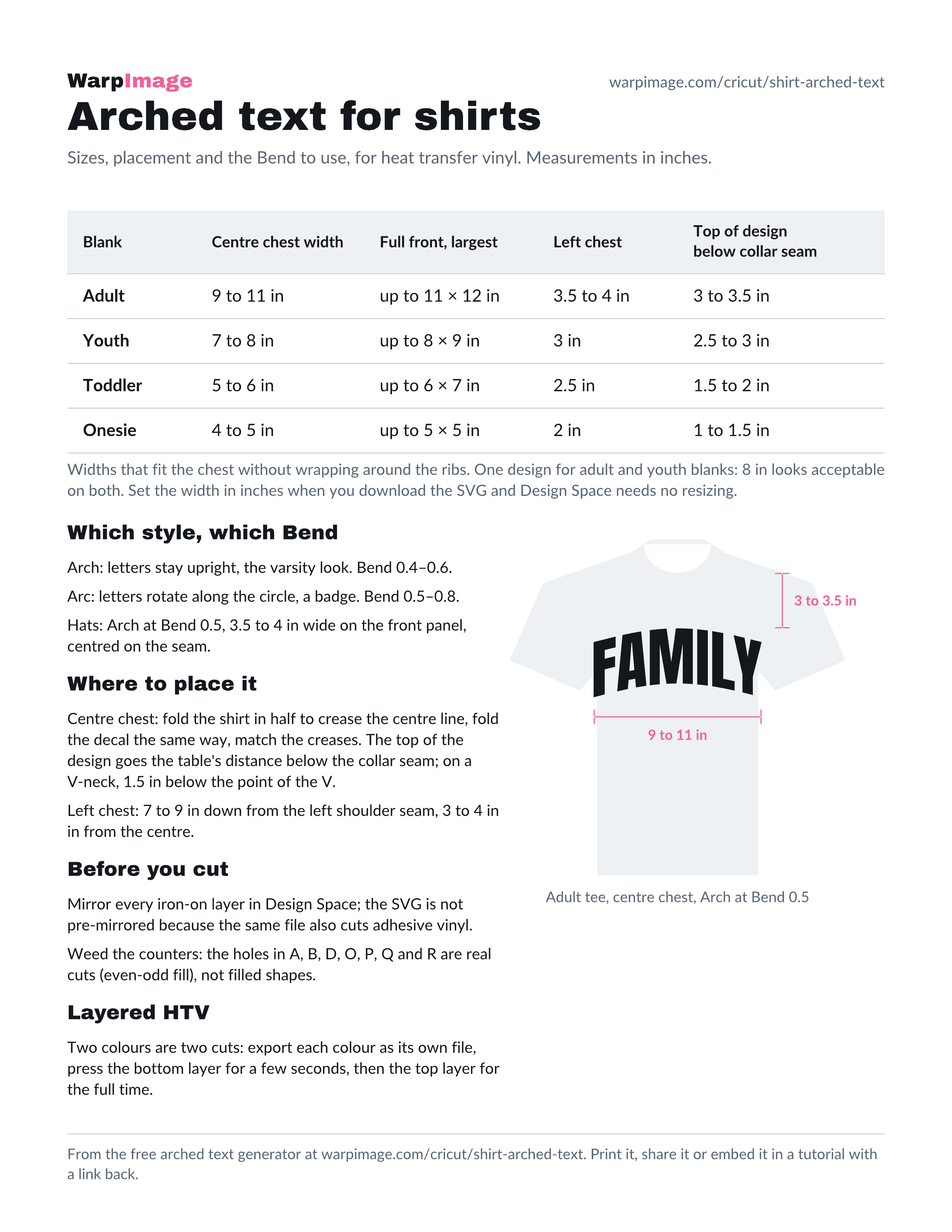
This table, the placement rules below and a shirt showing where the arch goes fit on one printable page: download the size sheet as a PDF or a PNG. It is free to print, to share and to embed in a tutorial with a link back here.
Where to place it
- Adult: top of the design 3 to 3.5 in below the collar seam, centered between the armpit seams. For a V-neck, 1.5 in below the point of the V.
- Youth: 2.5 to 3 in below the collar seam.
- Toddler: 1.5 to 2 in below the collar seam. Onesie: 1 to 1.5 in.
- Left chest: 7 to 9 in down from the left shoulder seam, 3 to 4 in in from the center.
- Hats: 3.5 to 4 in wide on a standard front panel, centered on the seam. Use Arch at Bend 0.5 so the text follows the panel’s curve; press with a hat press or a rolled towel inside the crown.
Fold the shirt in half to crease the center line, and fold the decal the same way. Match the creases.
The two HTV steps people forget
- Mirror before cutting. In Design Space, toggle Mirror on for every layer when the material is iron-on. The generator’s SVG is not pre-mirrored, because the same file also works for adhesive vinyl and for print.
- Weed the counters. The holes in A, B, D, O, P, Q and R have to come out. The SVG uses an even-odd fill so those holes are real cuts, not filled shapes. A weeding hook and good light make this fast; a tacky mat makes it slow.
Layered HTV
A two-color varsity design (white letters, red outline) is two cuts. Export the colors as separate files, or use the SVG Warper on a two-color file: each fill becomes its own layer, and Design Space sends each color to its own mat automatically. Press the bottom layer first for a few seconds, then the top layer for the full time.
Distressed and outline styles
The Warp presets work on any outlined font. For a distressed varsity look, apply the arch to a distressed font rather than trying to distress afterwards. For an outline-only style, use a font that ships with an outline weight; a stroke added in Design Space does not cut.